
Merge clips
Merge audio files into one track
Audio Editor & MP3 Cutter can merge multiple audio files into one track on iPhone. It is designed for users who need to combine voice clips, podcast segments, music ideas, or audio assets without moving files to a desktop editor.
Last updated: July 16, 2026
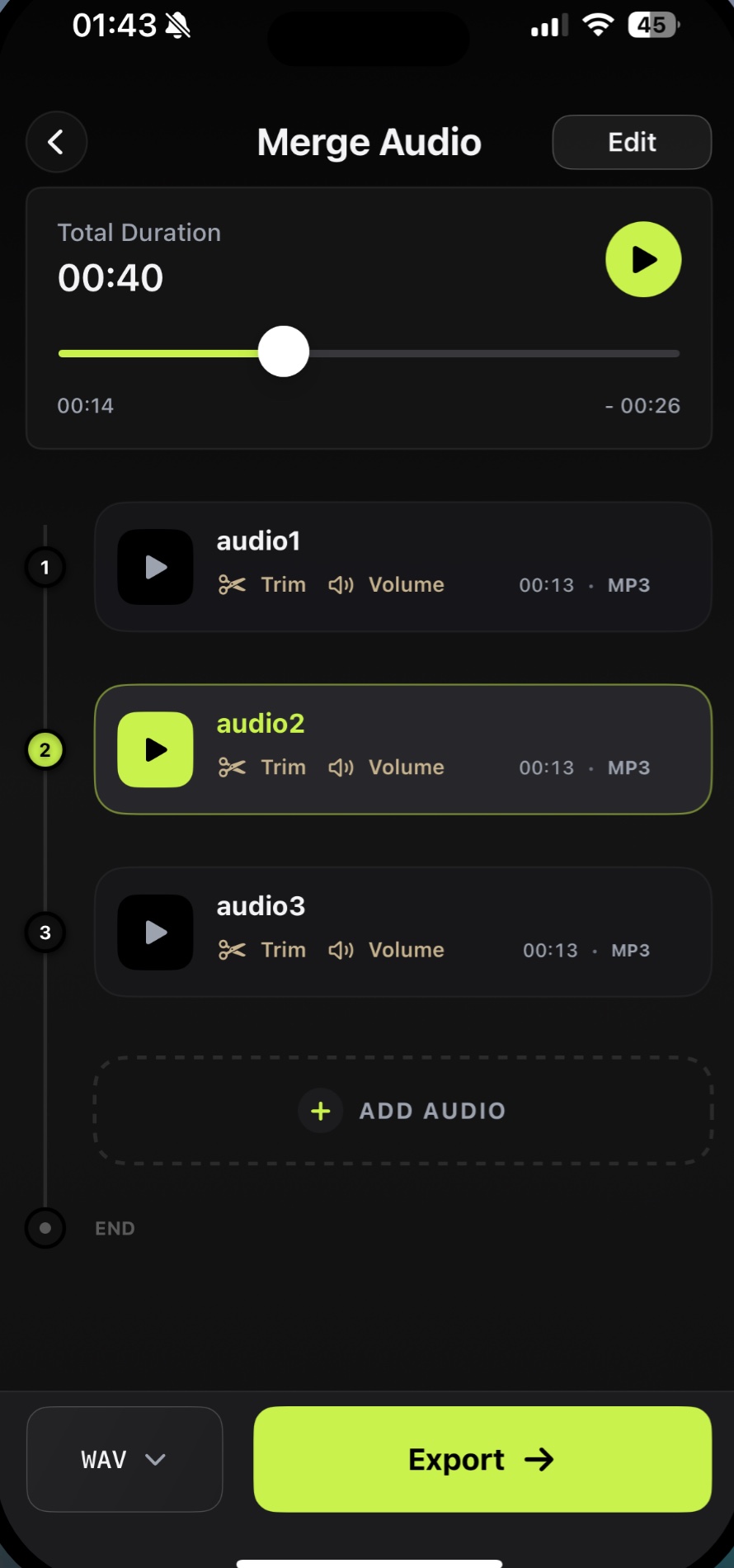
Audio Editor & MP3 Cutter can merge multiple audio files into one track on iPhone. It is designed for users who need to combine voice clips, podcast segments, music ideas, or audio assets without moving files to a desktop editor.
Download on the App StoreWhy it matters
Combine clips without desktop editing
- Add multiple audio clips
- Preview the combined duration
- Trim or adjust clips before export
- Choose output format before saving
FAQ
Merge questions
Can I combine multiple MP3 files on iPhone?
Yes. Import multiple clips, arrange them in the merge workflow, preview, and export the combined file.
Is merge useful for podcasts?
Yes. It works for stitching intros, interview clips, voice notes, and short podcast segments.
Can I edit each clip before merging?
Yes. The app includes trimming and volume tools that can be used as part of the editing workflow.
Use merge on iPhone
Combine multiple clips for narrations, podcasts, music drafts, voice notes, and reusable audio assets.
Free download. In-App Purchases.iOS 17.0 or later